Mandatory "Rate this item" field on feedback.
Summary: savagemadman expresses frustration with eBay's new mandatory "rate this item" field in the feedback section, arguing that it is not always relevant, especially when purchasing collectibles. lotzofuniquegoodies advises to simply give a 5-star rating if overall satisfied to proceed with leaving feedback. eburtonlab suggests an alternative method to bypass the field, recommending using the feedback link at the bottom of one's personal feedback page instead. Overall, there is dissatisfaction with eBay's interface changes, with a preference for their older UI.
How do I skip the stupid new mandatory "rate this item" field on the feedback screen? The "leave feedback" button is greyed out until you fill it in.
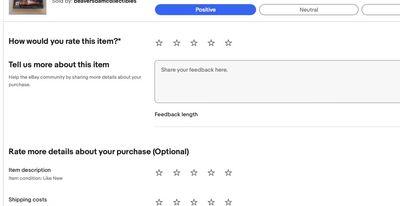
I'm there to leave feedback for the seller, not review an item. What if the seller is great and the product is terrible - does that reflect on the seller?
In my case I'm buying a collectable for the sake of adding to a collection, how "good" the product is doesn't matter.
I swear Ebay's UI gets worse every year. I'd rather use their 2004 interface over today's.

eburtonlab
You should be able to skip the "rate item" section of the feedback by not using the feedback link in your Purchase History but instead using the link at the bottom of your own feedback page:
https://www.ebay.ca/fdbk/leave_feedback
lotzofuniquegoodies
If you are overall satisfied just give it a 5 and be done with it.